Join an organization
To join an organization, you need to prove your identity. Parsec provides two ways to do so.
Join an organization with an invitation link
You have been invited to join an organization on Parsec! Before you get started, please make sure you have installed the Parsec app.
Both you and the host have to be available at the same time and go through the process together.
Start the invitation process
If you received an invitation link either by email or by any other means, make sure to verify it before clicking the link.
Important
If you do not trust the link, do not proceed with the invitation.
After making sure that the link is safe, simply click on the link. Parsec will start and guide you through the invitation process.
You can also start Parsec and paste the link on the welcome screen (Click
Create or jointhenJoin).
Verify your identity with a code exchange
In order to create a secure channel between you and the host, you will need to carry out a code exchange via an authentic channel (such as a regular phone call).
Important
Authentic channels are not confidential, but they guarantee that the information is not tampered: what your contact says is what you hear. You should avoid using SMS.
When you are ready, click I understand! and wait for the host to
start the process on its side.
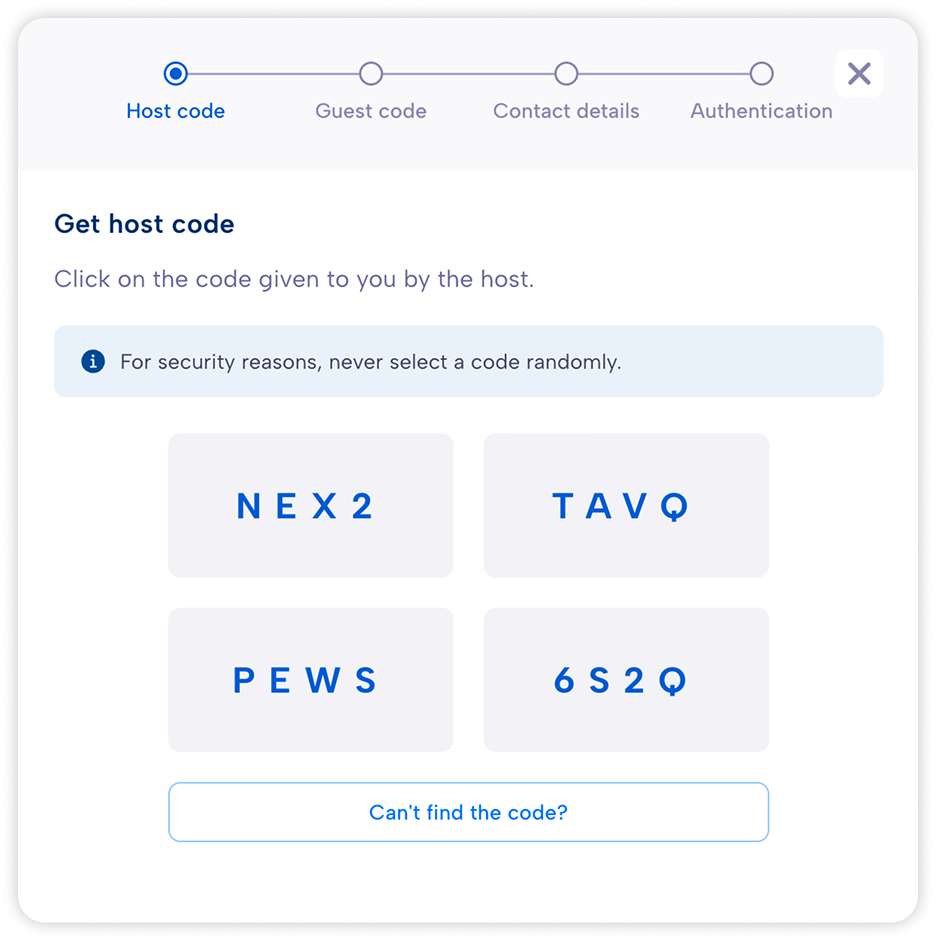
Select the code provided by your host from the list.
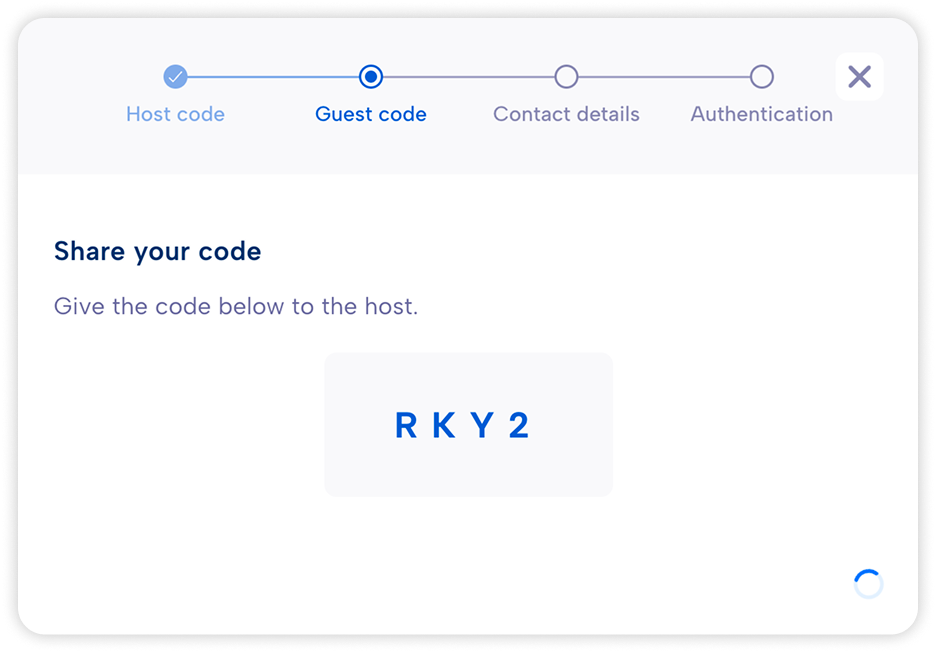
Then, share your code to the host and wait until it is selected.
Caution
If one of the codes to share is not present in the other’s list, it means there is a very high probability you are victim of a Man-in-the-middle attack.
Set up your account
Finally, enter your contact details and choose the preferred authentication method (this can be changed later from your profile).
You are ready for your first steps with Parsec!
Join an organization with a join request
You have been invited to join an organization on Parsec! Before you get started, please make sure you have installed the Parsec app.
Your identity will be verified with an identity provider. You and the administrator do not have to go through this process together. You first make a request to join an organization, and the administrator accepts it later.
Important
An identity provider is required to use this option. Those currently supported are:
a Public Key Infrastructure (PKI). Supported only on Windows.
a Single-Sign On (SSO) provider. Only ProConnect is supported at the moment.
Request to join the organization
If you received an link to join the organization either by email or by any other means, make sure to verify it before clicking the link.
Important
If you do not trust the link, do not proceed with the invitation.
After making sure that the link is safe, simply click on the link. Parsec will start and guide you through the invitation process.
You can also start Parsec and paste the link on the welcome screen (Click
Create or jointhenJoin).
Depending on your system, you may have to select the identity provider you would like to use (PKI or SSO).
Using an SSO (ProConnect)
Select your SSO provider
Authenticate with your SSO provider as usual
Enter your name, select your email address and click
ContinueClick
Continue
Using a PKI
Select the certificate matching your infrastructure
Click
Continue
Your join request has been sent and you should now see it with the Pending status.
Once accepted, a button
Add to my organizationswill appear on your request. Click on it to log into the organization. You may need to re-authenticate with your SSO provider.
You are ready for your first steps with Parsec!